
Construction safety induction in every language your crew speaks
A translated PDF does not prove that anyone understood the hazards. Gryffi turns your site induction into short, visual steps that workers complete on their phone in their own language, with a quiz at the end that shows who is ready for site.

Your data stays in Europe
Gryffi is fully hosted in the EU. We guarantee your data will never be transferred outside European borders.
The language barrier problem
Your Romanian electrician, Polish scaffolder and Bulgarian labourer all signed the same Dutch safety form. None of them could read it. You run a crew from seven countries, every briefing needs an interpreter, and you have no real proof that anyone understood the risks.
Why this puts your projects at risk
Accidents that could have been prevented
Close to a quarter of all fatal accidents at work in the EU happen in construction (Eurostat, 2024). A worker who did not understand the lockout procedure, the confined-space rule or the evacuation route is a risk to the whole site.
Compliance gaps that fail audits
Labour inspectors and VCA auditors want proof of understanding, not a signature under a text the worker could not read. If your induction only exists in Dutch, you cannot show that international workers were properly instructed.
The same toolbox talk, again and again
Site managers repeat the same briefing through an interpreter for every new crew. With high turnover and subcontractors coming and going, that time never stops adding up.
How Gryffi removes the language barrier
Gryffi turns your safety protocols into a visual, interactive journey. Workers open a link on their phone, no password needed, and go through the induction in their own language, one short step at a time. They explore the site in 360°, spot hazards in photos of real situations and ask an AI guide that answers from your own documents. You see who completed what and what they scored.
An AI guide that answers in 14 languages
Upload your safety manual, risk assessment and work instructions. Workers ask questions in their own language and get answers based on your documents, with the source cited. No interpreter needed for "which PPE in zone B?"
360° site tours with safety hotspots
Workers explore your site before their first day. Hotspots mark PPE zones, hazard areas, emergency exits and assembly points, so they arrive knowing the layout and where the risks are.
Visual quizzes that show understanding
Show photos of real site situations and ask workers to spot the hazard. Image-based questions work across reading levels. Set a passing score and the journey only continues when the worker gets it right.
What your journey could look like
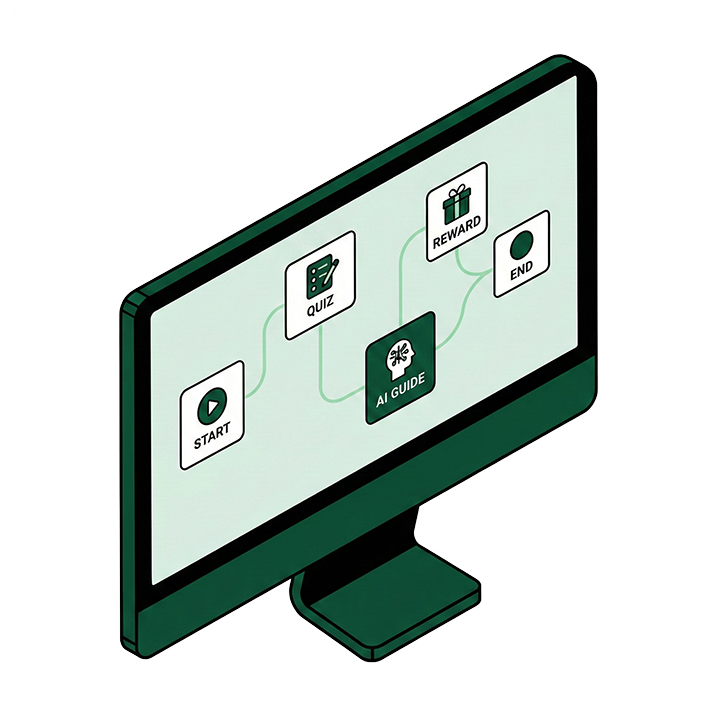
-
1
Welcome step where the worker picks their language, with a short video from the site manager
-
2
360° tour of the site showing assembly points, first aid, PPE zones and high-risk areas as interactive hotspots
-
3
PPE instructions with pictograms and a short video, followed by a form in which the worker confirms the equipment they received
-
4
Hazard-spotting quiz with photos from your own sites: unsecured loads, missing guardrails, electrical hazards. Passing score required.
-
5
Emergency procedures for fire, injury and evacuation, closed with a confirmation form and a completion reward
See It In Action
Watch how Gryffi transforms information
In just one minute, discover why teams choose Gryffi over traditional documents and presentations.
1 minute watch
Turn your document into a journey in 30 seconds
Upload any PDF and see exactly what your team would get. No signup, no credit card.
Processed in the EU. Your file is deleted within 15 minutes.
All data is hosted in the EU (servers in Germany, AI processing in France) and handled in line with the GDPR. Analytics shows per worker which steps were completed and what they scored, and you can export a PDF report for labour inspections and VCA audits.
Give every worker an induction they actually understand
Build your first safety journey for free. No credit card, no interpreter.
More industry solutions
Seasonal staff onboarding for campsites and holiday parks
Onboard seasonal workers before they arrive: a 360° park tour, house rules in their own language and an AI guide for the daily questions. Start free.
Hospital staff onboarding that is done before the first shift
Prepare new nurses, doctors and support staff before their first shift: 360° ward tours, hygiene quizzes and an AI guide on your own protocols. Start free.
Data centre technician onboarding before anyone touches a live rack
Prepare technicians before they touch a live rack: 360° facility tours, an AI guide trained on your vendor manuals and a certification quiz. Start free.